Emacs
You mean Vim?
No matter how much I try EMACS is just too slow for me. Its not snappy as vim. and often times its lagging and hanging and the package management is too slow. Its bluky and full of bloat. Dont get me wrong the base emacs is great. But as soon as I add packages and try to modify it, it keeps getting bulkier and difficult to manage. Whereas vim is snappy. And I can full use tmux and terminal and my hands and safe from injuries. And its comfy.
Documentation and Books and Reading Materials
- https://du-blog.ru/61
- https://github.com/emacs-tw/awesome-emacs
- From Vim to Emacs in Fourteen Days - The Chronicle
- [[Org Mode]]
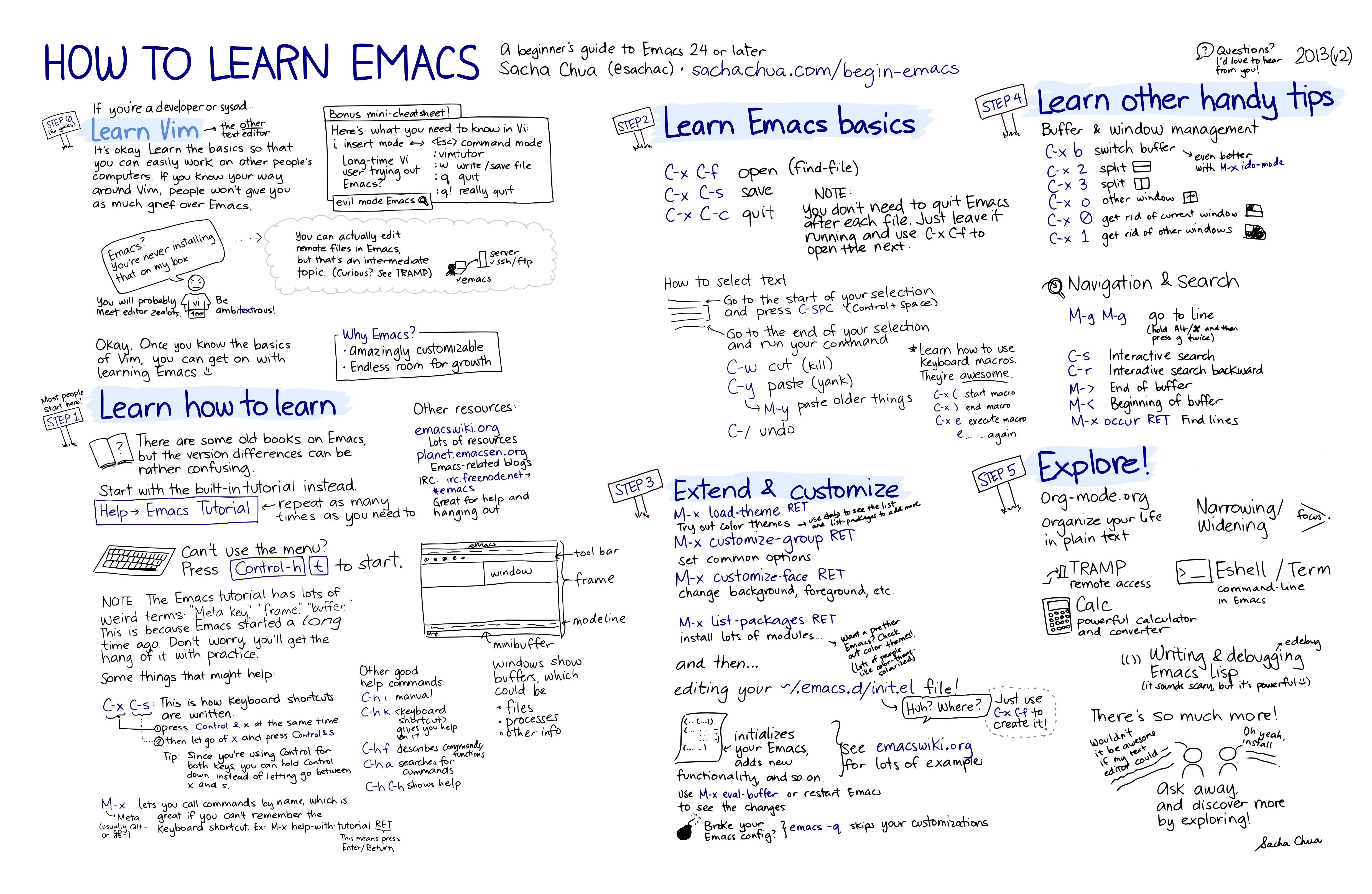
- How to Learn Emacs
- GitHub - munen/emacs.d: My emacs configuration documented in literate programming style
- Play Emacs like an instrument - YouTube
- https://sachachua.com/blog/wp-content/uploads/2013/05/How-to-Learn-Emacs-v2-Large.png
- Planet Emacslife
- https://masteringemacs.org/book
- https://github.com/redguardtoo/mastering-emacs-in-one-year-guide/blob/master/guide-en.org#L303
- https://github.com/bbatsov/crux
- https://www.gnu.org/software/emacs/manual/html_mono/autotype.html
- https://github.com/skeeto/elfeed
- https://github.com/radian-software/straight.el
- Emacs refcard (PDF)
Saving Emacs Sessions
https://www.gnu.org/software/emacs/manual/html_node/emacs/Saving-Emacs-Sessions.html
(unless (file-directory-p "~/.emacs.d/desktop")
(eshell-command "mkdir ~/.emacs.d/desktop"))
(setq desktop-path "~/.emacs.d/desktop")
(desktop-read "~/.emacs.d/desktop")
Paranthesis errors
Warning (initialization): An error occurred while loading ‘c:/Users/ravee/AppData/Roaming/.emacs’:

End of file during parsing: c:/github/dotfiles-main/stow_my_emacs/.emacs.d/init.el

To ensure normal operation, you should investigate and remove the
cause of the error in your initialization file.  Start Emacs with
the ‘--debug-init’ option to view a complete error backtrace. Disable showing Disable logging
This means that there is a unclosed paranthesis
Get and print an existing file name interactively with mini-buffer complete
(defun print-file (a)
  (interactive "fFile: ")
  (message a))
Interactively calling the function print-file will print the file name in mini-buffer.
Doom emacs bug
`(stringp afternoon-theme)
Message: Wrong type argument Details: (stringp afternoon-theme) Backtrace: (intern afternoon-theme)
Fix: https://emacs.stackexchange.com/questions/74715/packages-i-never-knew-they-existed-cause-problems https://github.com/doomemacs/doomemacs/issues/6960
cd ~/.emacs.d/.local/straight/repos/straight.el
git pull origin develop
[2022-11-28 Mon] Elisp introduction [[elisp]{.smallcaps}]{.tag tag-name=“elisp”}
[An Introduction to Emacs
Lisp](https://www.youtube.com/watch?v=2z-YBsd5snY)
https://harryrschwartz.com/2014/04/08/an-introduction-to-emacs-lisp.html
https://bzg.fr/en/learn-emacs-lisp-in-15-minutes/
Delete specific lines matching a regexp from a buffer.
M-x flush-lines{.verbatim}
For example say you have a find-grep buffer and you want to remove
certain lines. Copy the contents to anothe buffer with,
M-x copy-to-buffer{.verbatim} and use flush-lines to delete them.
Emacs shortcuts
- Â Upcase a word [M-t]
Using heading ids for storing and creating links instead of paths
So the problem with org mode internal linking is that once you create a
heading in a file and link it to other files you cannot move the file or
rename the heading. This is a pain in the ass, because I always rename
things all the time. The only way to overcome this problem is to use
enable use of id's and use that to store and create links.
First set the following variables.
;; Create uuid whenever i store a link

(setq org-id-link-to-org-use-id 'create-if-interactive-and-no-custom-id)


;; Store it a relative links

(setq org-id-locations-file-relative t)


;; To search for all the stored id's in the follwing files, for some reason this requires to add extra files to agenda. This should be a seperate option.

(setq org-agenda-text-search-extra-files

      (directory-files-recursively "~/my_repos" ".*\.org$\\|.*\.org_archive$"))
Then call this function to update the id's and locations.
(org-id-update-id-locations)
Store all these commands in the init.el file.
Now, store link with C-c l{.verbatim} and create link at a random file
with C-c C-l{.verbatim} and now emacs can follow that link with
C-c o{.verbatim} open link command. This was confusing to figure out
but once i did it seems simple.
Note that all these setting needs to be added before the org publish
functions as well.
Insert completion without performing action in ivy
For a long time i was not able to perform this. Basically what i want to
do was to insert the selection to mini-buffer without actually
performing the selection done action and make some edits.
https://oremacs.com/swiper/#key-bindings
M-i - ivy-insert-current
This keybind does it.
Emacs compilation with user input
https://endlessparentheses.com/provide-input-to-the-compilation-buffer.html
C-u M-x compile
<2022-09-08 Thu> Cool HTML export template for orgmode
http://thomasf.github.io/solarized-css/
<2022-08-25 Thu> Export both code and results in org mode [[blog]{.smallcaps}]{.tag tag-name=“blog”}Â [[emacs]{.smallcaps}]{.tag tag-name=“emacs”}Â [[org_mode]{.smallcaps}]{.tag tag-name=“org_mode”}
#+begin_src bash :exports both

echo hello

#+end_src


#+RESULTS:

: hello
<2022-08-01 Mon> Editing links in emacs org mode [[emacs]{.smallcaps}]{.tag tag-name=“emacs”}Â [[org_mode]{.smallcaps}]{.tag tag-name=“org_mode”}Â [[blog]{.smallcaps}]{.tag tag-name=“blog”}
- Â Place pointer on the link and
C-c C-l{.verbatim}
  https://superuser.com/a/726574
<2022-07-28 Thu> Enable horizontal scrolling in emacs with trackpad [[emacs]{.smallcaps}]{.tag tag-name=“emacs”}Â [[blog]{.smallcaps}]{.tag tag-name=“blog”}
https://stackoverflow.com/a/67758169/7914647
(setq mouse-wheel-flip-direction t)

(setq mouse-wheel-tilt-scroll t)
<2022-07-29 Fri> How to install and use emacs with flatpak install –user option [[emacs]{.smallcaps}]{.tag tag-name=“emacs”}Â [[blog]{.smallcaps}]{.tag tag-name=“blog”}Â [[flatpak]{.smallcaps}]{.tag tag-name=“flatpak”}Â [[linux]{.smallcaps}]{.tag tag-name=“linux”}
Emacs can be installed using flatpak for users without root access with
--user{.verbatim} option.
wget -nc https://dl.flathub.org/repo/appstream/org.gnu.emacs.flatpakref

flatpak install --user org.gnu.emacs.flatpakref
Emacs can be invoked with this command.
flatpak run org.gnu.emacs
To invoke gui mode emacs.
flatpak run org.gnu.emacs --display $DISPLAY
All emacs related binaries are stored under this path.
(ins)$ flatpak info org.gnu.emacs

Ref: app/org.gnu.emacs/x86_64/stable

ID: org.gnu.emacs

Arch: x86_64

Branch: stable

Origin: flathub

Collection ID: org.flathub.Stable

Date: 2022-04-08 09:04:04 +0000

Subject: Remove the point at end of screenshot caption (a9aa6a0e)

Commit: fa16b9ac37b045d4e771932b161e8f8db14c77fa34403a93985e85e84c14f392

Parent: fb3a2baca5dcc1ffb9c3b9127fb367d5912046ddcceb7806bad6e3dee6fc835d

Location: $HOME//.local/share/flatpak/app/org.gnu.emacs/x86_64/stable/fa16b9ac37b045d4e771932b161e8f8db14c77fa34403a93985e85e84c14f392

Installed size: 117.9 MB

Runtime: org.freedesktop.Sdk/x86_64/21.08

Sdk: org.freedesktop.Sdk/x86_64/21.08
$HOME/.local/share/flatpak/app/org.gnu.emacs/x86_64/stable/fa16b9ac37b045d4e771932b161e8f8db14c77fa34403a93985e85e84c14f392/files/bin
To execute other related binaries run the command like this, the
argument for that command comes at the end.
flatpak run  --command=etags org.gnu.emacs --help
To include path variable, to the sand-boxed application
flatpak run --env=PATH=$PATH org.gnu.emacs --display $DISPLAY
But this will mostly cause conflicts. So set proper paths when required.
<2022-07-25 Mon> Embed or include raw html inside org mode files [[emacs]{.smallcaps}]{.tag tag-name=“emacs”}Â [[org]{.smallcaps}]{.tag tag-name=“org”}Â [[mode]{.smallcaps}]{.tag tag-name=“mode”}Â [[blog]{.smallcaps}]{.tag tag-name=“blog”}
https://orgmode.org/manual/Quoting-HTML-tags.html
<2022-07-21 Thu> Treat underscores and hypens as part of word [[emacs]{.smallcaps}]{.tag tag-name=“emacs”}Â [[blog]{.smallcaps}]{.tag tag-name=“blog”}
Clone buffer / duplicate buffer
(clone-indirect-buffer)
Align text in emacs
https://www.emacswiki.org/emacs/AlignCommands
http://xahlee.info/emacs/emacs/emacs_align_and_sort.html
assign [class="Firefox"] $ws2
assign [class="qBittorrent"] $ws2
assign [class="obs"] $ws3
assign [class="keybr"] $ws3
assign [class="Liferea"] $ws4
assign [class="mpv"] $ws5
to
assign [class="Firefox"] Â Â Â $ws2
assign [class="qBittorrent"] Â $ws2
assign [class="obs"] Â Â Â Â Â $ws3
assign [class="keybr"] Â Â Â Â $ws3
assign [class="Liferea"] Â Â Â $ws4
assign [class="mpv"] Â Â Â Â Â $ws5
Mark the region and do the following
C-u M-x align-regexp RET .*\($ws*\).* RET -1 RET y{.verbatim}
Magit
Rebasing with magit
https://magit.vc/manual/magit/Rebasing.html
E-Lisp
- Â [Conquering Kubernetes with
  Emacs](https://www.youtube.com/watch?v=w3krYEeqnyk)
Terminal Emulator: `ansi-term`
- Â [Scrolling in
  ansi-term](https://stackoverflow.com/questions/5981151/how-to-scroll-up-in-emacs-ansi-term)
C-c C-j{.verbatim} C-c C-k{.verbatim}
Transpose words
Transpose words M-t (Also works in terminal)\\

Transpose characters C-t
Org-mode
Open link in same window
Plugins to try
Get and print an existing file name interactively with mini-buffer complete
(defun print-file (a)
  (interactive "fFile: ")
  (message a))
Interactively calling the function print-file will print the file name in mini-buffer.
Doom emacs bug
`(stringp afternoon-theme)
Message: Wrong type argument Details: (stringp afternoon-theme) Backtrace: (intern afternoon-theme)
Fix: https://emacs.stackexchange.com/questions/74715/packages-i-never-knew-they-existed-cause-problems https://github.com/doomemacs/doomemacs/issues/6960
cd ~/.emacs.d/.local/straight/repos/straight.el
git pull origin develop
[2022-11-28 Mon] Elisp introduction [[elisp]{.smallcaps}]{.tag tag-name=“elisp”}
[An Introduction to Emacs
Lisp](https://www.youtube.com/watch?v=2z-YBsd5snY)
https://harryrschwartz.com/2014/04/08/an-introduction-to-emacs-lisp.html
https://bzg.fr/en/learn-emacs-lisp-in-15-minutes/
Delete specific lines matching a regexp from a buffer.
M-x flush-lines{.verbatim}
For example say you have a find-grep buffer and you want to remove
certain lines. Copy the contents to anothe buffer with,
M-x copy-to-buffer{.verbatim} and use flush-lines to delete them.
Emacs shortcuts
- Â Upcase a word [M-t]
Using heading ids for storing and creating links instead of paths
So the problem with org mode internal linking is that once you create a
heading in a file and link it to other files you cannot move the file or
rename the heading. This is a pain in the ass, because I always rename
things all the time. The only way to overcome this problem is to use
enable use of id's and use that to store and create links.
First set the following variables.
;; Create uuid whenever i store a link

(setq org-id-link-to-org-use-id 'create-if-interactive-and-no-custom-id)


;; Store it a relative links

(setq org-id-locations-file-relative t)


;; To search for all the stored id's in the follwing files, for some reason this requires to add extra files to agenda. This should be a seperate option.

(setq org-agenda-text-search-extra-files

      (directory-files-recursively "~/my_repos" ".*\.org$\\|.*\.org_archive$"))
Then call this function to update the id's and locations.
(org-id-update-id-locations)
Store all these commands in the init.el file.
Now, store link with C-c l{.verbatim} and create link at a random file
with C-c C-l{.verbatim} and now emacs can follow that link with
C-c o{.verbatim} open link command. This was confusing to figure out
but once i did it seems simple.
Note that all these setting needs to be added before the org publish
functions as well.
Insert completion without performing action in ivy
For a long time i was not able to perform this. Basically what i want to
do was to insert the selection to mini-buffer without actually
performing the selection done action and make some edits.
https://oremacs.com/swiper/#key-bindings
M-i - ivy-insert-current
This keybind does it.
Emacs compilation with user input
https://endlessparentheses.com/provide-input-to-the-compilation-buffer.html
C-u M-x compile
<2022-09-16 Fri> Guess emacs dired destination
Lets say that you want to copy files from one dired split to the other
split, emacs can automatically guess the destination directory to make
this simpler.
(setq dired-dwim-target t)
https://emacs.stackexchange.com/questions/5603/how-to-quickly-copy-move-file-in-emacs-dired
<2022-09-08 Thu> Cool HTML export template for orgmode
http://thomasf.github.io/solarized-css/
<2022-08-25 Thu> Export both code and results in org mode [[blog]{.smallcaps}]{.tag tag-name=“blog”}Â [[emacs]{.smallcaps}]{.tag tag-name=“emacs”}Â [[org_mode]{.smallcaps}]{.tag tag-name=“org_mode”}
#+begin_src bash :exports both

  echo hello

#+end_src


#+RESULTS:

: hello
<2022-08-01 Mon> Editing links in emacs org mode [[emacs]{.smallcaps}]{.tag tag-name=“emacs”}Â [[org_mode]{.smallcaps}]{.tag tag-name=“org_mode”}Â [[blog]{.smallcaps}]{.tag tag-name=“blog”}
- Â Place pointer on the link and
C-c C-l{.verbatim}
  https://superuser.com/a/726574
<2022-07-28 Thu> Enable horizontal scrolling in emacs with trackpad [[emacs]{.smallcaps}]{.tag tag-name=“emacs”}Â [[blog]{.smallcaps}]{.tag tag-name=“blog”}
https://stackoverflow.com/a/67758169/7914647
(setq mouse-wheel-flip-direction t)

(setq mouse-wheel-tilt-scroll t)
<2022-07-29 Fri> How to install and use emacs with flatpak install –user option [[emacs]{.smallcaps}]{.tag tag-name=“emacs”}Â [[blog]{.smallcaps}]{.tag tag-name=“blog”}Â [[flatpak]{.smallcaps}]{.tag tag-name=“flatpak”}Â [[linux]{.smallcaps}]{.tag tag-name=“linux”}
Emacs can be installed using flatpak for users without root access with
--user{.verbatim} option.
wget -nc https://dl.flathub.org/repo/appstream/org.gnu.emacs.flatpakref

flatpak install --user org.gnu.emacs.flatpakref
Emacs can be invoked with this command.
flatpak run org.gnu.emacs
To invoke gui mode emacs.
flatpak run org.gnu.emacs --display $DISPLAY
All emacs related binaries are stored under this path.
(ins)$ flatpak info org.gnu.emacs

Ref: app/org.gnu.emacs/x86_64/stable

ID: org.gnu.emacs

Arch: x86_64

Branch: stable

Origin: flathub

Collection ID: org.flathub.Stable

Date: 2022-04-08 09:04:04 +0000

Subject: Remove the point at end of screenshot caption (a9aa6a0e)

Commit: fa16b9ac37b045d4e771932b161e8f8db14c77fa34403a93985e85e84c14f392

Parent: fb3a2baca5dcc1ffb9c3b9127fb367d5912046ddcceb7806bad6e3dee6fc835d

Location: $HOME//.local/share/flatpak/app/org.gnu.emacs/x86_64/stable/fa16b9ac37b045d4e771932b161e8f8db14c77fa34403a93985e85e84c14f392

Installed size: 117.9 MB

Runtime: org.freedesktop.Sdk/x86_64/21.08

Sdk: org.freedesktop.Sdk/x86_64/21.08
$HOME/.local/share/flatpak/app/org.gnu.emacs/x86_64/stable/fa16b9ac37b045d4e771932b161e8f8db14c77fa34403a93985e85e84c14f392/files/bin
To execute other related binaries run the command like this, the
argument for that command comes at the end.
flatpak run  --command=etags org.gnu.emacs --help
To include path variable, to the sand-boxed application
flatpak run --env=PATH=$PATH org.gnu.emacs --display $DISPLAY
But this will mostly cause conflicts. So set proper paths when required.
<2022-07-25 Mon> Embed or include raw html inside org mode files [[emacs]{.smallcaps}]{.tag tag-name=“emacs”}Â [[org]{.smallcaps}]{.tag tag-name=“org”}Â [[mode]{.smallcaps}]{.tag tag-name=“mode”}Â [[blog]{.smallcaps}]{.tag tag-name=“blog”}
https://orgmode.org/manual/Quoting-HTML-tags.html
<2022-07-21 Thu> Treat underscores and hypens as part of word [[emacs]{.smallcaps}]{.tag tag-name=“emacs”}Â [[blog]{.smallcaps}]{.tag tag-name=“blog”}
Clone buffer / duplicate buffer
(clone-indirect-buffer)
Align text in emacs
https://www.emacswiki.org/emacs/AlignCommands
http://xahlee.info/emacs/emacs/emacs_align_and_sort.html
assign [class="Firefox"] $ws2
assign [class="qBittorrent"] $ws2
assign [class="obs"] $ws3
assign [class="keybr"] $ws3
assign [class="Liferea"] $ws4
assign [class="mpv"] $ws5
to
assign [class="Firefox"] Â Â Â $ws2
assign [class="qBittorrent"] Â $ws2
assign [class="obs"] Â Â Â Â Â $ws3
assign [class="keybr"] Â Â Â Â $ws3
assign [class="Liferea"] Â Â Â $ws4
assign [class="mpv"] Â Â Â Â Â $ws5
Mark the region and do the following
C-u M-x align-regexp RET .*\($ws*\).* RET -1 RET y{.verbatim}
Magit
- Â [Magit Introduction and
  Demonstration](https://www.youtube.com/watch?v=vQO7F2Q9DwA)
E-Lisp
- Â [Conquering Kubernetes with
  Emacs](https://www.youtube.com/watch?v=w3krYEeqnyk)
Terminal Emulator: `ansi-term`
- Â [Scrolling in
  ansi-term](https://stackoverflow.com/questions/5981151/how-to-scroll-up-in-emacs-ansi-term)
C-c C-j{.verbatim} C-c C-k{.verbatim}
Transpose words
Transpose words M-t (Also works in terminal)\\

Transpose characters C-t