Ranger file manager
Managing files from commandline might be cumbersome time to time. To make the job easy there are quit a lot of terminal curses based file managers available like, ranger which uses Vi keybindings.
Installation
pip install ranger-fm
usage
ranger
keybindings
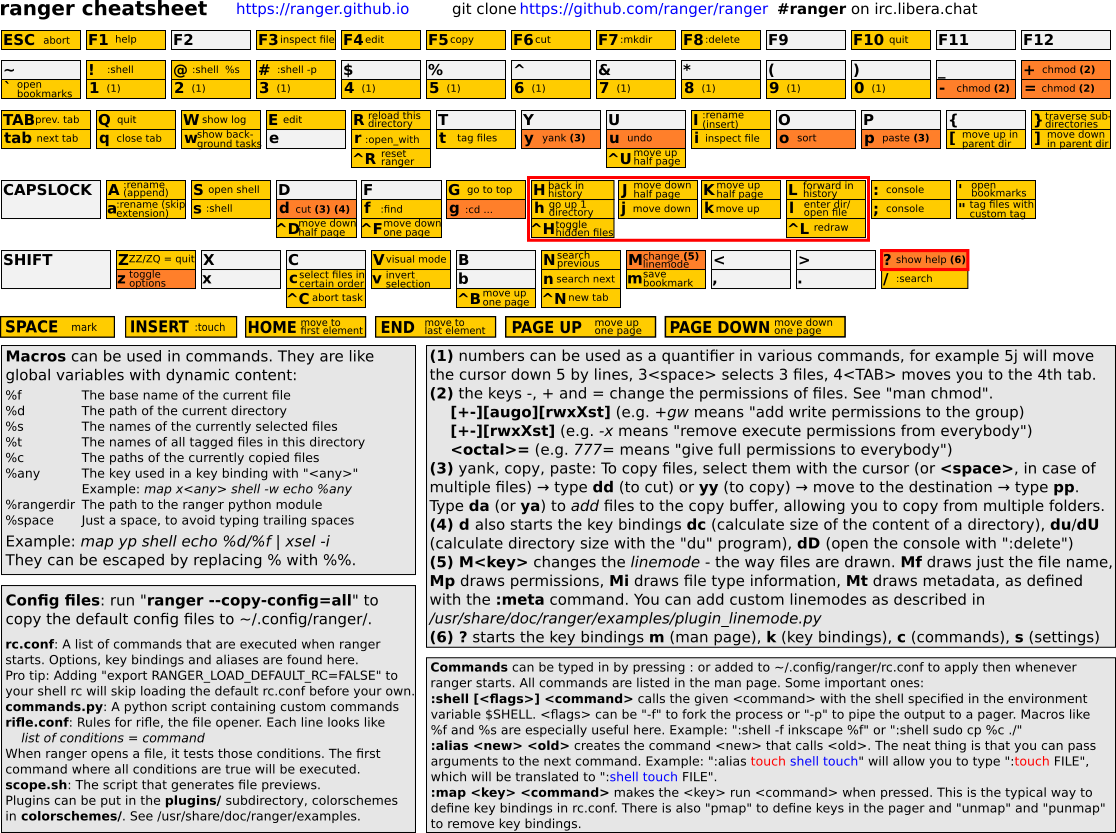
Official pages
https://ranger.github.io/documentation.html https://github.com/ranger/ranger
Tabbed mode
Ctrl-n
<Tab> key to switch between tabs
Show hidden files
Ctrl-h
zh
To cd into current curectory after exit
alias ranger='ranger --choosedir=$HOME/.rangerdir; LASTDIR=`cat $HOME/.rangerdir`; cd "$LASTDIR"'
Open Multiple files in vim from ranger
Select all the files with ranger
:shell vim %s
Open Multiple files in a remote vim server from ranger
:shell vim --remote %s
Ranger inside emacs
Emacs has a package called ranger and it successfully emulates ranger inside emacs and works very well.
(use-package ranger
    :straight t)